Recommendation block reference
The Raptor integration add-on introduces a set of recommendation blocks. These blocks are available in Page Builder and can be configured to control their behavior and output.
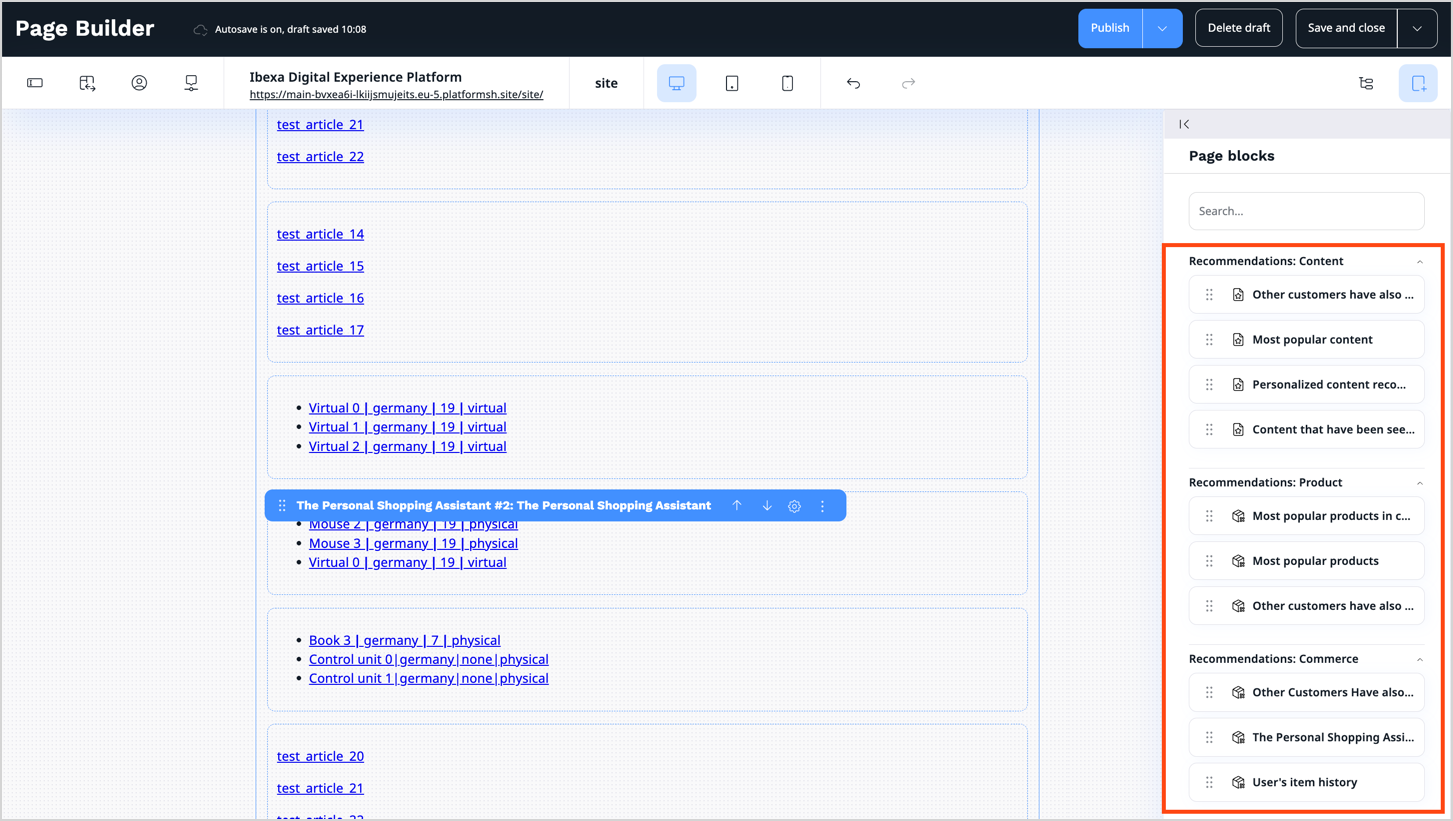
Each recommendation block corresponds to a specific Raptor module. You can configure it in the Raptor Control Panel where parameters and settings can be modified.
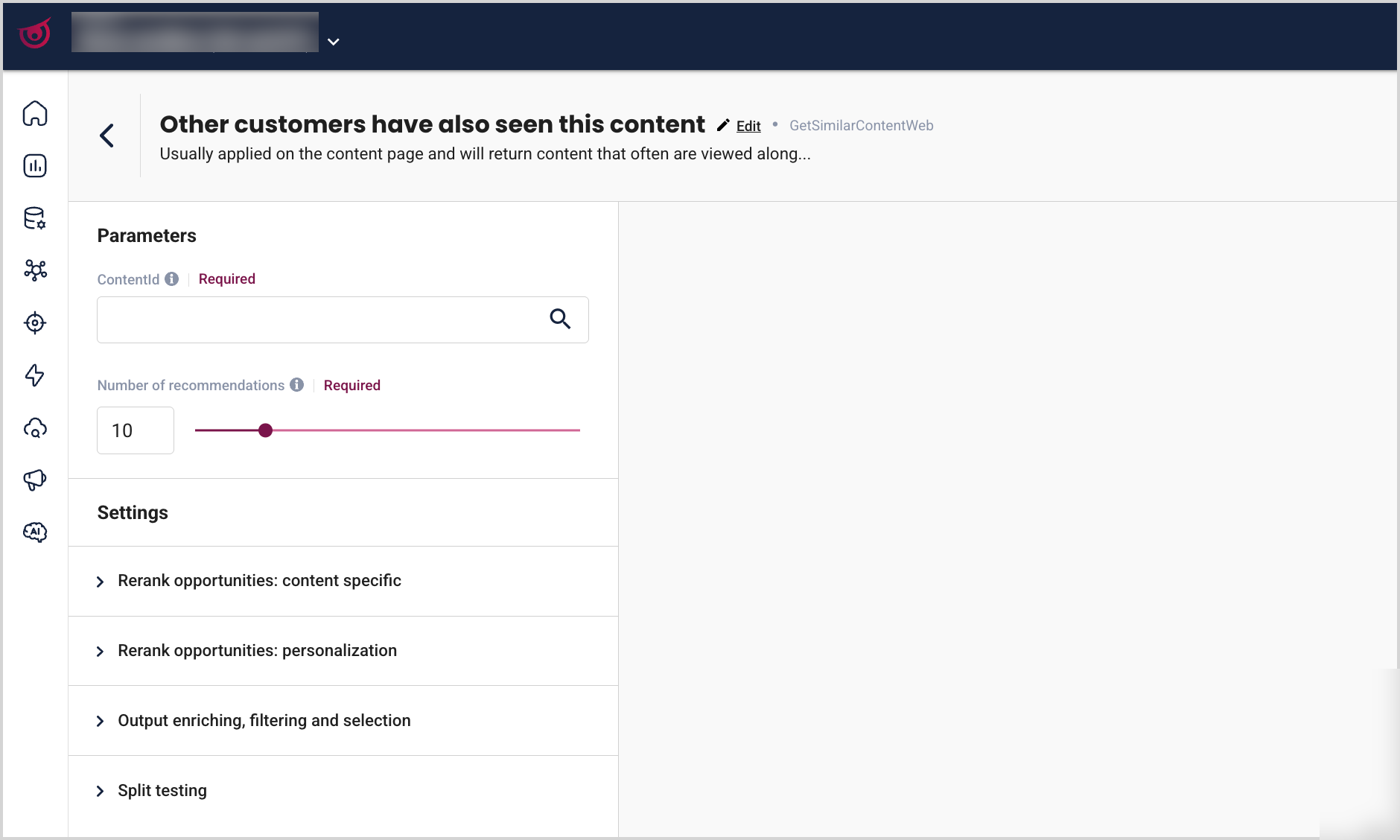
In Page Builder, only the required parameters for each block can be configured. Additional, optional settings are available through the Go to advanced settings in Raptor link. It redirects to the respective module configuration in the Raptor Control Panel, where these settings can be adjusted and saved.

Raptor recommendations can be added to a landing page by using blocks that belong to the following categories:
Recommendations: Content
The following blocks can be used to present content recommendations:
| Block | Description |
|---|---|
| Content that has been seen along with the item category | Displays content frequently viewed together with items from the same category. |
| Most popular content | Highlights the most frequently viewed content. |
| Other customers have also seen this content | Displays content viewed by other users with similar behavior. |
| Personalized content recommendations | Provides personalized content recommendations based on user behavior and preferences. |
Content that has been seen along with the item category block
Shows content that is often viewed together with items in the same category. Helps users discover related content.
This block uses the GetContentBasedOnProductCategoryWeb Raptor recommendation strategy.
On the Properties tab, set values in the following fields:
- Name – Enter a name for the page block.
- Name displayed on page (optional) - Enter a name for the block to be displayed on the page.
- Product category - Select product category.
- Recommendations limit - Set the number of recommendations to be displayed. Default = 4.
Most popular content block
Highlights the most trending or popular content that is most frequently viewed by users across the website. It helps identify popular and relevant content items.
This block uses the GetPopularContentWeb Raptor recommendation strategy.
On the Properties tab, set values in the following fields:
- Name – Enter a name for the page block.
- Name displayed on page (optional) - Enter a name for the block to be displayed on the page.
- Recommendations limit - Set the number of recommendations to be displayed. Default = 4.
Other customers have also seen this content block
Highlights content viewed by other users with similar behavior. Usually applied on the content page, returns content that is often viewed together with the given content. It increases the engagement of the customers by helping identify related and relevant content.
This block uses the GetSimilarContentWeb Raptor recommendation strategy.
On the Properties tab, set values in the following fields:
- Name – Enter a name for the page block.
- Name displayed on page (optional) - Enter a name for the block to be displayed on the page.
- Select content for recommendations - Select content to be used for recommendations. This content is used as the basis for recommendations, allowing Raptor to suggest similar or related items.
- Recommendations limit - Set the number of recommendations to be displayed. Default = 4.
Personalized content recommendations block
Generates complementary, personalized content tailored to each user based on their behavior and preferences. Increases relevance and engagement through personalized suggestions.
This block uses the GetUserContentRecommendationsWeb Raptor recommendation strategy.
On the Properties tab, set values in the following fields:
- Name – Enter a name for the page block.
- Name displayed on page (optional) - Enter a name for the block to be displayed on the page.
- Recommendations limit - Set the number of recommendations to be displayed. Default = 4.
Recommendations: Product
The following blocks can be used to display product suggestions based on visitors’ browsing history:
| Block | Description |
|---|---|
| Most popular products | Presents trending and highly popular products. |
| Most popular products in category | Highlights products that are most popular in the category. |
| Other customers have also seen | Shows products also viewed by other customers. |
Most popular products block
Presents products that are currently trending and widely popular among users. Its behavior is defined by the calculation type, interaction type, and aggregation period. Helps quickly identify top-performing and popular items.
This block uses the GetPopularItemsWeb Raptor recommendation strategy.
On the Properties tab, set values in the following fields:
- Name – Enter a name for the page block.
- Name displayed on page (optional) - Enter a name for the block to be displayed on the page.
- Recommendations limit - Set the number of recommendations to be displayed. Default = 4.
Toggle the Show only available items option on to display only products that are currently in stock.
Most popular products in category block
Displays the most popular products within a selected category. Its behavior is defined by the interaction type and aggregation period. Helps identify the most popular items within a specific category.
This block uses the GetPopularItemsInCategoryWeb Raptor recommendation strategy.
On the Properties tab, set values in the following fields:
- Name – Enter a name for the page block.
- Name displayed on page (optional) - Enter a name for the block to be displayed on the page.
- Product category - Select product category.
- Recommendations limit - Set the number of recommendations to be displayed. Default = 4.
Toggle the Show only available items option on to display only products that are currently in stock.
Other customers have also seen block
Shows products viewed by users with similar behavior. Usually applied on the product page, returns items that are often viewed together with the given product. Enhances user experience by suggesting related products.
This block uses the GetSimilarItemsWeb Raptor recommendation strategy.
On the Properties tab, set values in the following fields:
- Name – Enter a name for the page block.
- Name displayed on page (optional) - Enter a name for the block to be displayed on the page.
- Product code - Enter a product code to be used as a base product or select the base product from the Product catalog.
- Recommendations limit - Set the number of recommendations to be displayed. Default = 4.
Toggle the Show only available items option on to display only products that are currently in stock.
Recommendations: Commerce
The following blocks can be used to show recommendations based on visitors purchase history (buy and basket events):
| Block | Description |
|---|---|
| Other customers have also purchased | Displays items purchased by other customers who bought the same product. |
| The Personal Shopping Assistant | Assists users by suggesting relevant products in real time based on their activity. |
| User's item history | Displays the user’s item history or current basket, sorted by recent or top items. |
Other customers have also purchased block
Suggests products commonly bought together. Helps users find related products to encourage additional purchases.
This block uses the GetPIMRelatedItemsWeb Raptor recommendation strategy.
On the Properties tab, set values in the following fields:
- Name – Enter a name for the page block.
- Name displayed on page (optional) - Enter a name for the block to be displayed on the page.
- Product code - Enter a product code to be used as a base product or select the base product from the Product catalog.
- Recommendations limit - Set the number of recommendations to be displayed. Default = 4.
Toggle the Show only available items option on to display only products that are currently in stock.
The Personal Shopping Assistant block
Provides real-time product recommendations based on user behavior. The web personal shopping assistant recommends items at each step of the customer journey, with a short-term focus. It helps users discover relevant items while browsing by providing personalized recommendations based on their current behavior.
This block uses the GetUserItemRecommendationsWeb Raptor recommendation strategy.
On the Properties tab, set values in the following fields:
- Name – Enter a name for the page block.
- Name displayed on page (optional) - Enter a name for the block to be displayed on the page.
- Product (optional) - Add or select base product.
- Recommendations limit - Set the number of recommendations to be displayed. Default = 4.
Toggle the Show only available items option on to display only products that are currently in stock.
User's item history block
Shows the user’s past or current basket items, sorted by recent activity or top items. Makes it easier to find and review previously viewed or added products. This module can be configured to return recently viewed items, most interacted items, or items currently in the basket.
This block uses the GetUserItemHistoryWeb Raptor recommendation strategy.
On the Properties tab, set values in the following fields:
- Name – Enter a name for the page block.
- Name displayed on page (optional) - Enter a name for the block to be displayed on the page.
- Recommendations limit - Set the number of recommendations to be displayed. Default = 4.
Toggle the Show only available items option on to display only products that are currently in stock.
Tip
For a list of all blocks available in Page Builder, see Block reference.